1. Shutdown all services - adstpall.sh.
2. BACKUP the files in the following directories and then remove them :
Note: Once you complete these steps, all the above directories would still be
present, but will be empty.
$OA_HTML/cabo/images/cache
$OA_HTML/cabo/styles/cache
3. Remove all files under the $COMMON_TOP/_pages folder
4. Compile jsps:
cd $FND_TOP/patch/115/bin
./ojspCompile.pl --compile --flush -p 2
5. Clear browser cache on PC: Delete cookies, temp internet files, history from IE
6. Restart the services - adstrtal.sh
Monday, July 22, 2013

compile jsp in EBS R12
Compile a jsp page:
cd $OA_HTML
$FND_TOP/patch/115/bin/ojspCompile.pl --compile -s 'xxxx.jsp' -log err.log --flush
Compile all jsp pages:
$FND_TOP/patch/115/bin/ojspCompile.pl --compile --flush -p 4
Enable Automatic Compilation of JSP pages in R12
edit the $CONTEXT_FILE
Change value for the entry s_jsp_main_mode from justrun to recompile
run AutoConfig, restart the web tier services.
cd $OA_HTML
$FND_TOP/patch/115/bin/ojspCompile.pl --compile -s 'xxxx.jsp' -log err.log --flush
Compile all jsp pages:
$FND_TOP/patch/115/bin/ojspCompile.pl --compile --flush -p 4
Enable Automatic Compilation of JSP pages in R12
edit the $CONTEXT_FILE
Change value for the entry s_jsp_main_mode from justrun to recompile
run AutoConfig, restart the web tier services.
Tuesday, October 9, 2012
How to get versions used by Oracle E-business suite.
1.Operating system
uname -a
2. Database
sqlplus apps/apps
3. Oracle applications
select release_name from fnd_product_group;
4. Forms, sql, pls, reports
strings file_name |grep $Header
or use this:
SELECT 'strings $'
|| DECODE (app_short_name,
'OFA', 'FA',
'SQLGL', 'GL',
'SQLAP', 'AP',
app_short_name
)
|| '_TOP/'
|| subdir
|| '/'
|| filename
|| ' | grep Header'
FROM ad_files
WHERE filename = '<your file name>';
5. Database objects
select text
from user_source
where name='&package_name' and text like '%$Header%';
select name, text
from dba_source
where text like '%.pls%' and line < 10;
select VIEW_NAME, TEXT
from USER_VIEWS
where VIEW_NAME = '&VIEW_NAME';
6. Workflow
select * from WF_RESOURCES where NAME='WF_VERSION';
uname -a
2. Database
sqlplus apps/apps
3. Oracle applications
select release_name from fnd_product_group;
4. Forms, sql, pls, reports
strings file_name |grep $Header
or use this:
SELECT 'strings $'
|| DECODE (app_short_name,
'OFA', 'FA',
'SQLGL', 'GL',
'SQLAP', 'AP',
app_short_name
)
|| '_TOP/'
|| subdir
|| '/'
|| filename
|| ' | grep Header'
FROM ad_files
WHERE filename = '<your file name>';
5. Database objects
select text
from user_source
where name='&package_name' and text like '%$Header%';
select name, text
from dba_source
where text like '%.pls%' and line < 10;
select VIEW_NAME, TEXT
from USER_VIEWS
where VIEW_NAME = '&VIEW_NAME';
6. Workflow
select * from WF_RESOURCES where NAME='WF_VERSION';
Thursday, September 6, 2012
How to create Oracle password verify function.
1. create password_verify function by sys
CREATE OR REPLACE FUNCTION toa_pass_verify (
username VARCHAR2,
PASSWORD VARCHAR2,
old_password VARCHAR2
)
RETURN BOOLEAN
IS
n BOOLEAN;
m INTEGER;
differ INTEGER;
isdigit BOOLEAN;
ischarlower BOOLEAN;
ischarupper BOOLEAN;
ispunct BOOLEAN;
digitarray VARCHAR2 (20);
punctarray VARCHAR2 (25);
chararraylower VARCHAR2 (52);
chararrayupper VARCHAR2 (52);
BEGIN
digitarray := '0123456789';
chararraylower := 'abcdefghijklmnopqrstuvwxyz';
chararrayupper := 'ABCDEFGHIJKLMNOPQRSTUVWXYZ';
punctarray := '!"#$%&()``*+,-/:;<=>?_{}[]';
-- Check if the password is same as the username
IF NLS_LOWER (PASSWORD) = NLS_LOWER (username)
THEN
raise_application_error (-20001, 'Password same as or similar to user');
END IF;
-- Check for the minimum length of the password
IF LENGTH (PASSWORD) < 8
THEN
raise_application_error (-20002, 'Password length less than 8');
END IF;
-- Check if the password is too simple. A dictionary of words may be
-- maintained and a check may be made so as not to allow the words
-- that are too simple for the password.
IF NLS_LOWER (PASSWORD) IN
('welcome', 'database', 'account', 'user', 'password', 'oracle',
'computer', 'abcd')
THEN
raise_application_error (-20002, 'Password too simple');
END IF;
-- Check if the password contains at least one letter, one digit and one
-- punctuation mark.
-- 1. Check for the digit
isdigit := FALSE;
m := LENGTH (PASSWORD);
FOR i IN 1 .. 10
LOOP
FOR j IN 1 .. m
LOOP
IF SUBSTR (PASSWORD, j, 1) = SUBSTR (digitarray, i, 1)
THEN
isdigit := TRUE;
--GOTO findcharlower;
END IF;
END LOOP;
END LOOP;
IF isdigit = FALSE
THEN
raise_application_error
(-20003,
'Password should contain at least one digit'
);
END IF;
-- 2. Check for the lowwer case character
ischarlower := FALSE;
FOR i IN 1 .. LENGTH (chararraylower)
LOOP
FOR j IN 1 .. m
LOOP
IF SUBSTR (PASSWORD, j, 1) = SUBSTR (chararraylower, i, 1)
THEN
ischarlower := TRUE;
--GOTO findcharupper;
END IF;
END LOOP;
END LOOP;
IF ischarlower = FALSE
THEN
raise_application_error
(-20003,
'Password should contain at least one lower case character and one punctuation'
);
END IF;
-- 3. Check for the upper case character
ischarupper := FALSE;
FOR i IN 1 .. LENGTH (chararrayupper)
LOOP
FOR j IN 1 .. m
LOOP
IF SUBSTR (PASSWORD, j, 1) = SUBSTR (chararrayupper, i, 1)
THEN
ischarupper := TRUE;
--GOTO findpunct;
END IF;
END LOOP;
END LOOP;
IF ischarupper = FALSE
THEN
raise_application_error
(-20003,
'Password should contain at least one upper character and one punctuation'
);
END IF;
-- 4. Check for the punctuation
ispunct := FALSE;
FOR i IN 1 .. LENGTH (punctarray)
LOOP
FOR j IN 1 .. m
LOOP
IF SUBSTR (PASSWORD, j, 1) = SUBSTR (punctarray, i, 1)
THEN
ispunct := TRUE;
--GOTO endsearch;
END IF;
END LOOP;
END LOOP;
IF ispunct = FALSE
THEN
raise_application_error
(-20003,
'Password should contain at least one digit, one character and one punctuation'
);
END IF;
-- Everything is fine; return TRUE ;
RETURN (TRUE);
END;
/
2. create profile:
CREATE PROFILE MY_PROFILE LIMIT
FAILED_LOGIN_ATTEMPTS 3 -- Account locked after 3 failed logins.
PASSWORD_LOCK_TIME unlimited -- Number of days account is locked for. UNLIMITED required explicit unlock by DBA.
PASSWORD_LIFE_TIME 60 -- Password expires after 90 days.
PASSWORD_GRACE_TIME 6 -- Grace period for password expiration.
PASSWORD_REUSE_TIME 360 -- Number of days until a specific password can be reused. UNLIMITED means never.
PASSWORD_REUSE_MAX 6 -- The number of changes required before a password can be reused. UNLIMITED means never.
PASSWORD_VERIFY_FUNCTION PASSWORD_VERIFY
3. create users:
create user TEST
identified by password4TEST#
profile MY_PROFILE
CREATE OR REPLACE FUNCTION toa_pass_verify (
username VARCHAR2,
PASSWORD VARCHAR2,
old_password VARCHAR2
)
RETURN BOOLEAN
IS
n BOOLEAN;
m INTEGER;
differ INTEGER;
isdigit BOOLEAN;
ischarlower BOOLEAN;
ischarupper BOOLEAN;
ispunct BOOLEAN;
digitarray VARCHAR2 (20);
punctarray VARCHAR2 (25);
chararraylower VARCHAR2 (52);
chararrayupper VARCHAR2 (52);
BEGIN
digitarray := '0123456789';
chararraylower := 'abcdefghijklmnopqrstuvwxyz';
chararrayupper := 'ABCDEFGHIJKLMNOPQRSTUVWXYZ';
punctarray := '!"#$%&()``*+,-/:;<=>?_{}[]';
-- Check if the password is same as the username
IF NLS_LOWER (PASSWORD) = NLS_LOWER (username)
THEN
raise_application_error (-20001, 'Password same as or similar to user');
END IF;
-- Check for the minimum length of the password
IF LENGTH (PASSWORD) < 8
THEN
raise_application_error (-20002, 'Password length less than 8');
END IF;
-- Check if the password is too simple. A dictionary of words may be
-- maintained and a check may be made so as not to allow the words
-- that are too simple for the password.
IF NLS_LOWER (PASSWORD) IN
('welcome', 'database', 'account', 'user', 'password', 'oracle',
'computer', 'abcd')
THEN
raise_application_error (-20002, 'Password too simple');
END IF;
-- Check if the password contains at least one letter, one digit and one
-- punctuation mark.
-- 1. Check for the digit
isdigit := FALSE;
m := LENGTH (PASSWORD);
FOR i IN 1 .. 10
LOOP
FOR j IN 1 .. m
LOOP
IF SUBSTR (PASSWORD, j, 1) = SUBSTR (digitarray, i, 1)
THEN
isdigit := TRUE;
--GOTO findcharlower;
END IF;
END LOOP;
END LOOP;
IF isdigit = FALSE
THEN
raise_application_error
(-20003,
'Password should contain at least one digit'
);
END IF;
-- 2. Check for the lowwer case character
ischarlower := FALSE;
FOR i IN 1 .. LENGTH (chararraylower)
LOOP
FOR j IN 1 .. m
LOOP
IF SUBSTR (PASSWORD, j, 1) = SUBSTR (chararraylower, i, 1)
THEN
ischarlower := TRUE;
--GOTO findcharupper;
END IF;
END LOOP;
END LOOP;
IF ischarlower = FALSE
THEN
raise_application_error
(-20003,
'Password should contain at least one lower case character and one punctuation'
);
END IF;
-- 3. Check for the upper case character
ischarupper := FALSE;
FOR i IN 1 .. LENGTH (chararrayupper)
LOOP
FOR j IN 1 .. m
LOOP
IF SUBSTR (PASSWORD, j, 1) = SUBSTR (chararrayupper, i, 1)
THEN
ischarupper := TRUE;
--GOTO findpunct;
END IF;
END LOOP;
END LOOP;
IF ischarupper = FALSE
THEN
raise_application_error
(-20003,
'Password should contain at least one upper character and one punctuation'
);
END IF;
-- 4. Check for the punctuation
ispunct := FALSE;
FOR i IN 1 .. LENGTH (punctarray)
LOOP
FOR j IN 1 .. m
LOOP
IF SUBSTR (PASSWORD, j, 1) = SUBSTR (punctarray, i, 1)
THEN
ispunct := TRUE;
--GOTO endsearch;
END IF;
END LOOP;
END LOOP;
IF ispunct = FALSE
THEN
raise_application_error
(-20003,
'Password should contain at least one digit, one character and one punctuation'
);
END IF;
-- Everything is fine; return TRUE ;
RETURN (TRUE);
END;
/
2. create profile:
CREATE PROFILE MY_PROFILE LIMIT
FAILED_LOGIN_ATTEMPTS 3 -- Account locked after 3 failed logins.
PASSWORD_LOCK_TIME unlimited -- Number of days account is locked for. UNLIMITED required explicit unlock by DBA.
PASSWORD_LIFE_TIME 60 -- Password expires after 90 days.
PASSWORD_GRACE_TIME 6 -- Grace period for password expiration.
PASSWORD_REUSE_TIME 360 -- Number of days until a specific password can be reused. UNLIMITED means never.
PASSWORD_REUSE_MAX 6 -- The number of changes required before a password can be reused. UNLIMITED means never.
PASSWORD_VERIFY_FUNCTION PASSWORD_VERIFY
3. create users:
create user TEST
identified by password4TEST#
profile MY_PROFILE
Enable Oracle flashback database:
sqlplus /as sysdba
alter system set db_recovery_file_dest_size=8G;
alter system set db_recovery_file_dest='/u01/app/oracle/FRA';
shutdown immediate;
startup mount;
alter database flashback on;
alter database open;
alter system set db_flashback_retention_target=720;
alter system set db_recovery_file_dest_size=8G;
alter system set db_recovery_file_dest='/u01/app/oracle/FRA';
shutdown immediate;
startup mount;
alter database flashback on;
alter database open;
alter system set db_flashback_retention_target=720;
Simple Oracle FGA example
ADD_POLICY:
exec DBMS_FGA.ADD_POLICY(
object_schema => 'apps',
object_name => 'fga_test',
policy_name => 'fga_test',
audit_condition => 'name = ''ab'' ',
audit_column => 'name',
statement_types => 'insert,update,delete,select');
DISABLE_POLICY:
exec DBMS_FGA.DISABLE_POLICY(
object_schema =>'apps',
object_name =>'fga_test',
policy_name =>'fga_test' );
DROP_POLICY:
exec DBMS_FGA.DROP_POLICY(
object_schema =>'apps',
object_name =>'fga_test',
policy_name =>'fga_test' );
select * from dba_audit_policy_columns
select * from dba_fga_audit_trail
exec DBMS_FGA.ADD_POLICY(
object_schema => 'apps',
object_name => 'fga_test',
policy_name => 'fga_test',
audit_condition => 'name = ''ab'' ',
audit_column => 'name',
statement_types => 'insert,update,delete,select');
DISABLE_POLICY:
exec DBMS_FGA.DISABLE_POLICY(
object_schema =>'apps',
object_name =>'fga_test',
policy_name =>'fga_test' );
DROP_POLICY:
exec DBMS_FGA.DROP_POLICY(
object_schema =>'apps',
object_name =>'fga_test',
policy_name =>'fga_test' );
select * from dba_audit_policy_columns
select * from dba_fga_audit_trail
Run R12 AutoConfig in Parallel Mode
Command to run parallel AutoConfig
Application Tier
perl $AD_TOP/bin/adconfig.pl contextfile=<absolute path to the context file> –parallel
Database Tier
perl $ORACLE_HOME/appssutil/bin/adconfig.pl contextfile=<absolute path to the context file> –parallel
Application Tier
perl $AD_TOP/bin/adconfig.pl contextfile=<absolute path to the context file> –parallel
Database Tier
perl $ORACLE_HOME/appssutil/bin/adconfig.pl contextfile=<absolute path to the context file> –parallel
R12 clone with shared appl_top(NFS mount)
Assume your R12 has two nodes:
node1: apps(root+web_entry+web_application+batch_process)+db
three mount point:
/local (local mount, INST_TOP)
/shared (SAN mount, and NFS out, stores application's APPL_TOP, ORACLE_HOME, IAS_ORACLE_HOME, COMMON_TOP)
/db (SAN for database)
node2: apps(root+web_entry+web_application)
only one mount
/local (local mount, INST_TOP)
Prepare the source system
Execute the following commands to prepare the source system for cloning:
a.Prepare the source system database tier for cloning
Log on to the source system as the ORACLE user, and run the following commands:
$ cd [RDBMS ORACLE_HOME]/appsutil/scripts/[CONTEXT_NAME]
$ perl adpreclone.pl dbTier
b.Prepare the source system application tier for cloning
Log on to the source system as the APPLMGR user, and run the following commands on each node that contains an APPL_TOP:
$ cd [INST_TOP]/admin/scripts
$ perl adpreclone.pl appsTier
Copy the application tier file system
you only need to copy the files in node1.
Copy the database node file system
Configure the target systemRun the following commands to configure the target system. You will be prompted for specific target system values such as SID, paths, and ports.
a.Configure the target system database server
Log on to the target system as the ORACLE user and enter the following commands
$ cd [RDBMS ORACLE_HOME]/appsutil/clone/bin
$ perl adcfgclone.pl dbTier
b.Configure the target system application tier server nodes
Log on to the target system as the APPLMGR user and enter the following commands:
$ cd [COMMON_TOP]/clone/bin
$ perl adcfgclone.pl appsTier
Add nodes into apps server.
1. in the node you mount the application(node1),
cd [COMMON_TOP]/clone/bin
perl adclonectx.pl addnode contextfile=$CONTEXT_FILE
2. in node2
cd [COMMON_TOP]/clone/bin
mkdir -p /local/inst/apps/$CONTEXT_NAME (create the directory)
perl [AD_TOP]/bin/adconfig.pl contextfile=<the xml file generated in step 1>
node1: apps(root+web_entry+web_application+batch_process)+db
three mount point:
/local (local mount, INST_TOP)
/shared (SAN mount, and NFS out, stores application's APPL_TOP, ORACLE_HOME, IAS_ORACLE_HOME, COMMON_TOP)
/db (SAN for database)
node2: apps(root+web_entry+web_application)
only one mount
/local (local mount, INST_TOP)
Prepare the source system
Execute the following commands to prepare the source system for cloning:
a.Prepare the source system database tier for cloning
Log on to the source system as the ORACLE user, and run the following commands:
$ cd [RDBMS ORACLE_HOME]/appsutil/scripts/[CONTEXT_NAME]
$ perl adpreclone.pl dbTier
b.Prepare the source system application tier for cloning
Log on to the source system as the APPLMGR user, and run the following commands on each node that contains an APPL_TOP:
$ cd [INST_TOP]/admin/scripts
$ perl adpreclone.pl appsTier
Copy the application tier file system
you only need to copy the files in node1.
Copy the database node file system
Configure the target systemRun the following commands to configure the target system. You will be prompted for specific target system values such as SID, paths, and ports.
a.Configure the target system database server
Log on to the target system as the ORACLE user and enter the following commands
$ cd [RDBMS ORACLE_HOME]/appsutil/clone/bin
$ perl adcfgclone.pl dbTier
b.Configure the target system application tier server nodes
Log on to the target system as the APPLMGR user and enter the following commands:
$ cd [COMMON_TOP]/clone/bin
$ perl adcfgclone.pl appsTier
Add nodes into apps server.
1. in the node you mount the application(node1),
cd [COMMON_TOP]/clone/bin
perl adclonectx.pl addnode contextfile=$CONTEXT_FILE
2. in node2
cd [COMMON_TOP]/clone/bin
mkdir -p /local/inst/apps/$CONTEXT_NAME (create the directory)
perl [AD_TOP]/bin/adconfig.pl contextfile=<the xml file generated in step 1>
txkrun.pl errors in R12
txkrun.pl with following errors,
Failed to get connection using s_apps_jdbc_connect_descriptor=jdbc:oracle:thin:xxxxxx
java.sql.SQLException: ORA-00604: error occurred at recursive SQL level 1
ORA-12705: Cannot access NLS data files or invalid environment specified
The problem is at the jave version, people should use 1.6 wich came with the application(under the $IAS_ORACLE_HOME/appsutil/jdk/jre/bin/java).
to find out which java you are using
$which java
to find out the java version you are using
$java -version
if you current java environment is not set at version 1.6, then
export PATH=$IAS_ORACLE_HOME/appsutil/jdk/jre/bin:$PATH
and try txkrun.pl again
Failed to get connection using s_apps_jdbc_connect_descriptor=jdbc:oracle:thin:xxxxxx
java.sql.SQLException: ORA-00604: error occurred at recursive SQL level 1
ORA-12705: Cannot access NLS data files or invalid environment specified
The problem is at the jave version, people should use 1.6 wich came with the application(under the $IAS_ORACLE_HOME/appsutil/jdk/jre/bin/java).
to find out which java you are using
$which java
to find out the java version you are using
$java -version
if you current java environment is not set at version 1.6, then
export PATH=$IAS_ORACLE_HOME/appsutil/jdk/jre/bin:$PATH
and try txkrun.pl again
Wednesday, September 5, 2012
R12 form builder frmbld.sh problem.
The problem that I had with this frmbld.sh is, it can't open existing files.
Solutions:
Unset LANG environment or
Add the following in $ORACLE_HOME/bin/frmbld.sh just before the line $ORACLE_HOME/bin/frmbld $*
## Check LANG variable for UTF character set
if echo $LANG | /bin/grep -i '\.utf.*8' > /dev/null
then
export LANG=`echo $LANG | /bin/sed 's#\.[u|U][t|T][f|F].*8.*##'`
fi
Solutions:
Unset LANG environment or
Add the following in $ORACLE_HOME/bin/frmbld.sh just before the line $ORACLE_HOME/bin/frmbld $*
## Check LANG variable for UTF character set
if echo $LANG | /bin/grep -i '\.utf.*8' > /dev/null
then
export LANG=`echo $LANG | /bin/sed 's#\.[u|U][t|T][f|F].*8.*##'`
fi
Tuesday, September 4, 2012
Some Unix/Linux command:
Some Unix/Linux command:
create symbolic link:
ln -s {target-filename} {symbolic-filename}
copy symbolic file:
cp -RH
unzip all zip files under current directory to /tmp:
unzip \*.zip -d /tmp
mkdir Create any missing intermediate pathname components:
mkdir -p
rsync:
/usr/local/bin/rsync --stats --recursive --times --perms --links --delete --inplace /source /target
check the Linux package installed.
rpm -qa --queryformat "%{NAME}-%{VERSION}-%{RELEASE} (%{ARCH})\n" | grep your_package_name
and more...................
create symbolic link:
ln -s {target-filename} {symbolic-filename}
copy symbolic file:
cp -RH
unzip all zip files under current directory to /tmp:
unzip \*.zip -d /tmp
mkdir Create any missing intermediate pathname components:
mkdir -p
rsync:
/usr/local/bin/rsync --stats --recursive --times --perms --links --delete --inplace /source /target
check the Linux package installed.
rpm -qa --queryformat "%{NAME}-%{VERSION}-%{RELEASE} (%{ARCH})\n" | grep your_package_name
and more...................
Thursday, August 30, 2012
SSH for Oracle Apps dba
Assume you have two apps nodes, both files system own by operating system user applmgr.
1. generate public and private keys in you loacl host
-bash-3.2$ ssh-keygen
2. Copy the public key to remote server
-bash-3.2$ ssh-copy-id -i ~/.ssh/id_rsa.pub remotehost.mydomain
example to shutdown apps in remote server(from you localhost)
ssh remotehost.mydomain '. .bash_profile; $ADMIN_SCRIPTS_HOME/adstpall.sh apps/apps'
using ssh with rsync
rsync -av -e ssh /source user@remoteserver:/target
1. generate public and private keys in you loacl host
-bash-3.2$ ssh-keygen
2. Copy the public key to remote server
-bash-3.2$ ssh-copy-id -i ~/.ssh/id_rsa.pub remotehost.mydomain
example to shutdown apps in remote server(from you localhost)
ssh remotehost.mydomain '. .bash_profile; $ADMIN_SCRIPTS_HOME/adstpall.sh apps/apps'
using ssh with rsync
rsync -av -e ssh /source user@remoteserver:/target
Tuesday, August 28, 2012
script to shutdown/start Weblogic components(oid, discoverer...)
startup:
# Set environment variables
MW_HOME=/oracle/FMW11
DOMAIN_HOME=$MW_HOME/user_projects/domains/Forms
ORACLE_INSTANCE=$MW_HOME/instances/forms
export MW_HOME DOMAIN_HOME ORACLE_INSTANCE
# +++++++++++++++++++++++++++++++++++++++++++++++++++++++++++++++++++++++
# WEBLOGIC SERVER DOMAIN STARTUP
#
# If required, start up WebLogic Domain Servers
# This section can be commented if you working with a FMW 11g AS Instance
# (for example Web Tier) which has no dependency on a WebLogic Domain
# +++++++++++++++++++++++++++++++++++++++++++++++++++++++++++++++++++++++
# The following files need to exist in order to startup automatically
# $DOMAIN_HOME/servers/AdminServer/security/boot.properties
# $DOMAIN_HOME/servers/<managed server name>/security/boot.properties
# Each file must contain:
# username=weblogic
# password= <= This password is automatically obfuscated the next time the
# Weblogic Server is started up
#
# Optionally start up the WebLogic Domain Admin Server
# The Admin Server does not need to be up and running for the
# individual managed servers to start up
# However, if Admin Server is not up and running, Fusion Middleware Control (EM)
# and WebLogic Admin Console will not function.
echo "Starting up the AdminServer ..."
# Note although we redirect stdout and stderr to /dev/null they are redirected to
# the AdminServer.log
nohup $DOMAIN_HOME/startWebLogic.sh >/dev/null 2>/dev/null &
#
# Wait for some seconds to make sure the AdminServer is listening
# before we attempt to start up the individual managed servers.
# The managed servers will need to connect to the Admin Server in order
# to for the EM applications to be able to "see" these instances
#
sleep 120
#
# In this example we are starting WLS_FORMS and WLS_REPORTS,
# just replace these names by the managed servers corresponding
# to your installation
# e.g. wls_ods1
#
# The example also assumes the AdminServer is listening on port 7001,
# replace the port in "t3://localhost:7001/" if AdminServer is
# listening on a different port
# Replace "localhost" by the actual hostname where the AdminServer is running. e.g. in a cluster
# environment
#
echo "Starting up WLS_FORMS ..."
nohup $DOMAIN_HOME/bin/startManagedWebLogic.sh WLS_FORMS t3://localhost:7001/ >/dev/null 2>/dev/null &
echo "Starting up WLS_REPORTS ..."
nohup $DOMAIN_HOME/bin/startManagedWebLogic.sh WLS_REPORTS t3://localhost:7001/ >/dev/null 2>/dev/null &
# ++++++++++++++++++++++++++++++++++++++++++++++++++++++++++++++++++++++++
# SYSTEM COMPONENTS STARTUP
# If required, start up OPMN managed processes
# This section can be commented if you working with a FMW 11g AS Instance
# (for example SOA / WebCenter) which has no dependency on system components
# ++++++++++++++++++++++++++++++++++++++++++++++++++++++++++++++++++++++++
echo "Starting up the OPMN managed components ..."
$ORACLE_INSTANCE/bin/opmnctl startall
Shutdown:
# Set environment variables
MW_HOME=/oracle/FMW11
DOMAIN_HOME=$MW_HOME/user_projects/domains/Forms
ORACLE_INSTANCE=$MW_HOME/instances/forms
export MW_HOME DOMAIN_HOME ORACLE_INSTANCE
# ++++++++++++++++++++++++++++++++++++++++++++++++++++++++++++++++++++++++
# SYSTEM COMPONENTS STOP
# If required, stop the OPMN managed processes
# This section can be commented if you working with a FMW 11g AS Instance
# (for example SOA / WebCenter) which has no dependency on system components
# ++++++++++++++++++++++++++++++++++++++++++++++++++++++++++++++++++++++++
echo "Stopping the OPMN managed components ..."
$ORACLE_INSTANCE/bin/opmnctl stopall
# +++++++++++++++++++++++++++++++++++++++++++++++++++++++++++++++++++++++
# WEBLOGIC SERVER DOMAIN STOP
#
# If required, stop the WebLogic Domain Servers
# This section can be commented if you working with a FMW 11g AS Instance
# (for example Web Tier) which has no dependency on a WebLogic Domain
# +++++++++++++++++++++++++++++++++++++++++++++++++++++++++++++++++++++++
# The following files need to exist in order to stop automatically
# $DOMAIN_HOME/servers/AdminServer/security/boot.properties
# $DOMAIN_HOME/servers/<managed server name>/security/boot.properties
# Each file must contain:
# username=weblogic
# password= <= This password is automatically obfuscated the next time the
# Weblogic Server is started up
#
#
# In this example we are stopping WLS_FORMS and WLS_REPORTS,
# just replace these names by the managed servers
# corresponding to your installation
# e.g. wls_ods1
# Note: The Admin Server must be up and running!
# The example also assumes the AdminServer is listening on port 7001,
# replace the port in "t3://localhost:7001/" if AdminServer is
# listening on a different port
# Replace "localhost" by the actual hostname where the AdminServer is running. e.g. in a cluster
# environment
#
echo "Shutting down WLS_FORMS ..."
nohup $DOMAIN_HOME/bin/stopManagedWebLogic.sh WLS_FORMS t3://localhost:7001/ >/dev/null 2>/dev/null &
# In busy environments you may want to a different command to perform a forceful shutdown instead stopManagedWebLogic.sh
# Note the preferred option is stopManagedWebLogic.sh as it performs a graceful shutdown (i.e. wait for current requests to finish).
# This is the command to run instead of stopManagedWebLogic.sh
# java weblogic.Admin -url localhost:7001 -username weblogic -password welcome1 FORCESHUTDOWN WLS_FORMS
#
sleep 60
echo "Shutting down WLS_REPORTS ..."
nohup $DOMAIN_HOME/bin/stopManagedWebLogic.sh WLS_REPORTS t3://localhost:7001/ >/dev/null 2>/dev/null &
#
# We wait 120 seconds before stopping the AdminServer to allow enough time for WLS_FORMS and WLS_REPORTS to shutdown
# If you see 120 seconds may not be enough just change the sleep 120 by a bigger value like sleep 300
sleep 120
# Stop the WebLogic Domain Admin Server
echo "Shutting down the AdminServer ..."
# Note although we redirect stdout and stderr to /dev/null they are redirected
# to the AdminServer.log
nohup $DOMAIN_HOME/stopWebLogic.sh >/dev/null 2>/dev/null &
# Set environment variables
MW_HOME=/oracle/FMW11
DOMAIN_HOME=$MW_HOME/user_projects/domains/Forms
ORACLE_INSTANCE=$MW_HOME/instances/forms
export MW_HOME DOMAIN_HOME ORACLE_INSTANCE
# +++++++++++++++++++++++++++++++++++++++++++++++++++++++++++++++++++++++
# WEBLOGIC SERVER DOMAIN STARTUP
#
# If required, start up WebLogic Domain Servers
# This section can be commented if you working with a FMW 11g AS Instance
# (for example Web Tier) which has no dependency on a WebLogic Domain
# +++++++++++++++++++++++++++++++++++++++++++++++++++++++++++++++++++++++
# The following files need to exist in order to startup automatically
# $DOMAIN_HOME/servers/AdminServer/security/boot.properties
# $DOMAIN_HOME/servers/<managed server name>/security/boot.properties
# Each file must contain:
# username=weblogic
# password= <= This password is automatically obfuscated the next time the
# Weblogic Server is started up
#
# Optionally start up the WebLogic Domain Admin Server
# The Admin Server does not need to be up and running for the
# individual managed servers to start up
# However, if Admin Server is not up and running, Fusion Middleware Control (EM)
# and WebLogic Admin Console will not function.
echo "Starting up the AdminServer ..."
# Note although we redirect stdout and stderr to /dev/null they are redirected to
# the AdminServer.log
nohup $DOMAIN_HOME/startWebLogic.sh >/dev/null 2>/dev/null &
#
# Wait for some seconds to make sure the AdminServer is listening
# before we attempt to start up the individual managed servers.
# The managed servers will need to connect to the Admin Server in order
# to for the EM applications to be able to "see" these instances
#
sleep 120
#
# In this example we are starting WLS_FORMS and WLS_REPORTS,
# just replace these names by the managed servers corresponding
# to your installation
# e.g. wls_ods1
#
# The example also assumes the AdminServer is listening on port 7001,
# replace the port in "t3://localhost:7001/" if AdminServer is
# listening on a different port
# Replace "localhost" by the actual hostname where the AdminServer is running. e.g. in a cluster
# environment
#
echo "Starting up WLS_FORMS ..."
nohup $DOMAIN_HOME/bin/startManagedWebLogic.sh WLS_FORMS t3://localhost:7001/ >/dev/null 2>/dev/null &
echo "Starting up WLS_REPORTS ..."
nohup $DOMAIN_HOME/bin/startManagedWebLogic.sh WLS_REPORTS t3://localhost:7001/ >/dev/null 2>/dev/null &
# ++++++++++++++++++++++++++++++++++++++++++++++++++++++++++++++++++++++++
# SYSTEM COMPONENTS STARTUP
# If required, start up OPMN managed processes
# This section can be commented if you working with a FMW 11g AS Instance
# (for example SOA / WebCenter) which has no dependency on system components
# ++++++++++++++++++++++++++++++++++++++++++++++++++++++++++++++++++++++++
echo "Starting up the OPMN managed components ..."
$ORACLE_INSTANCE/bin/opmnctl startall
Shutdown:
# Set environment variables
MW_HOME=/oracle/FMW11
DOMAIN_HOME=$MW_HOME/user_projects/domains/Forms
ORACLE_INSTANCE=$MW_HOME/instances/forms
export MW_HOME DOMAIN_HOME ORACLE_INSTANCE
# ++++++++++++++++++++++++++++++++++++++++++++++++++++++++++++++++++++++++
# SYSTEM COMPONENTS STOP
# If required, stop the OPMN managed processes
# This section can be commented if you working with a FMW 11g AS Instance
# (for example SOA / WebCenter) which has no dependency on system components
# ++++++++++++++++++++++++++++++++++++++++++++++++++++++++++++++++++++++++
echo "Stopping the OPMN managed components ..."
$ORACLE_INSTANCE/bin/opmnctl stopall
# +++++++++++++++++++++++++++++++++++++++++++++++++++++++++++++++++++++++
# WEBLOGIC SERVER DOMAIN STOP
#
# If required, stop the WebLogic Domain Servers
# This section can be commented if you working with a FMW 11g AS Instance
# (for example Web Tier) which has no dependency on a WebLogic Domain
# +++++++++++++++++++++++++++++++++++++++++++++++++++++++++++++++++++++++
# The following files need to exist in order to stop automatically
# $DOMAIN_HOME/servers/AdminServer/security/boot.properties
# $DOMAIN_HOME/servers/<managed server name>/security/boot.properties
# Each file must contain:
# username=weblogic
# password= <= This password is automatically obfuscated the next time the
# Weblogic Server is started up
#
#
# In this example we are stopping WLS_FORMS and WLS_REPORTS,
# just replace these names by the managed servers
# corresponding to your installation
# e.g. wls_ods1
# Note: The Admin Server must be up and running!
# The example also assumes the AdminServer is listening on port 7001,
# replace the port in "t3://localhost:7001/" if AdminServer is
# listening on a different port
# Replace "localhost" by the actual hostname where the AdminServer is running. e.g. in a cluster
# environment
#
echo "Shutting down WLS_FORMS ..."
nohup $DOMAIN_HOME/bin/stopManagedWebLogic.sh WLS_FORMS t3://localhost:7001/ >/dev/null 2>/dev/null &
# In busy environments you may want to a different command to perform a forceful shutdown instead stopManagedWebLogic.sh
# Note the preferred option is stopManagedWebLogic.sh as it performs a graceful shutdown (i.e. wait for current requests to finish).
# This is the command to run instead of stopManagedWebLogic.sh
# java weblogic.Admin -url localhost:7001 -username weblogic -password welcome1 FORCESHUTDOWN WLS_FORMS
#
sleep 60
echo "Shutting down WLS_REPORTS ..."
nohup $DOMAIN_HOME/bin/stopManagedWebLogic.sh WLS_REPORTS t3://localhost:7001/ >/dev/null 2>/dev/null &
#
# We wait 120 seconds before stopping the AdminServer to allow enough time for WLS_FORMS and WLS_REPORTS to shutdown
# If you see 120 seconds may not be enough just change the sleep 120 by a bigger value like sleep 300
sleep 120
# Stop the WebLogic Domain Admin Server
echo "Shutting down the AdminServer ..."
# Note although we redirect stdout and stderr to /dev/null they are redirected
# to the AdminServer.log
nohup $DOMAIN_HOME/stopWebLogic.sh >/dev/null 2>/dev/null &
odf and xdf in Oracle E-Business Suite
odf - Object Description file, Oracle use this in EBS to create database objects, ie tables, views, indexes. The replacement for odf is called xdf.
useage of odf:
$AD_TOP/bin/adodfcmp odffile=<Filename> mode=<Objects to be checked/updated> changedb=NO \
userid=<User>/<Password> touser=<User>/<Password> priv_schema=SYSTEM/<Password>
useage of xdf:
$JAVA_TOP/oracle/apps/fnd/odf2/adjava -mx512m -nojit oracle.apps.fnd.odf2.FndXdfCmp <Oracle_Schema> <Oracle_Password> \
<apps_schema> <apps_password> <jdbc protocol> <JDBC_Connect_String> <Object Type> \
<full path to xdf file> <full path of $FND_TOP/patch/115/xdf/xsl>
More details in Oracle support notes:
How to verify or create a Database Object using a odf (adodfcmp) or xdf (FndXdfCmp) file ? [ID 551325.1]
useage of odf:
$AD_TOP/bin/adodfcmp odffile=<Filename> mode=<Objects to be checked/updated> changedb=NO \
userid=<User>/<Password> touser=<User>/<Password> priv_schema=SYSTEM/<Password>
useage of xdf:
$JAVA_TOP/oracle/apps/fnd/odf2/adjava -mx512m -nojit oracle.apps.fnd.odf2.FndXdfCmp <Oracle_Schema> <Oracle_Password> \
<apps_schema> <apps_password> <jdbc protocol> <JDBC_Connect_String> <Object Type> \
<full path to xdf file> <full path of $FND_TOP/patch/115/xdf/xsl>
More details in Oracle support notes:
How to verify or create a Database Object using a odf (adodfcmp) or xdf (FndXdfCmp) file ? [ID 551325.1]
How to clear mid-tiers cache in R12
Functional Administrator->Core Services->Caching Framework->Global Configuration->"clear All Cache" button
R12 Personalization Export and Import
Export from source instance
1. Set profile option "FND: Personalization Document Root Path", default is /tmp/custdocs
2. Functional Administrator->Personalization-> Import/Export
select from the "Personalization Repository" then click the "Export to File System" button, it will create files in that "/tmp/custdocs" direcotry.
Import into target instance
1. Set profile option "FND: Personalization Document Root Path" in your target instance.
2. copy the export files to your target instance, put it under the "FND: Personalization Document Root Path" directory in your target instance.
3. Functional Administrator->Personalization-> Import/Export
click on the "Exported personalizations" on the left, then select the personalizations you need, and click "Import from File System"
Addition information:
Get the Personalization Document info: run this as apps user:
SQL> set serveroutput on
SQL> exec jdr_utils.listCustomizations('<full document name>')
export/import translations:
export:
Functional Administrator->Personalization Tab -> Put the Document Path (under the "Application Catalog" tab not the "Import/Export" tab, the document path can be obtained by going to the page -> About This Page -> Personalization) -> Click on GO
Click on Manage Personalizations -> Check the Box for Site -> Extract Translations -> Select your language and click on Apply button
import:
Functional Administrator->Personalization Tab -> Put the Document Path (same as used above) -> Click on GO
Click on Manage Personalizations -> Check the Box for Site -> Upload Translations
1. Set profile option "FND: Personalization Document Root Path", default is /tmp/custdocs
2. Functional Administrator->Personalization-> Import/Export
select from the "Personalization Repository" then click the "Export to File System" button, it will create files in that "/tmp/custdocs" direcotry.
Import into target instance
1. Set profile option "FND: Personalization Document Root Path" in your target instance.
2. copy the export files to your target instance, put it under the "FND: Personalization Document Root Path" directory in your target instance.
3. Functional Administrator->Personalization-> Import/Export
click on the "Exported personalizations" on the left, then select the personalizations you need, and click "Import from File System"
Addition information:
Get the Personalization Document info: run this as apps user:
SQL> set serveroutput on
SQL> exec jdr_utils.listCustomizations('<full document name>')
export/import translations:
export:
Functional Administrator->Personalization Tab -> Put the Document Path (under the "Application Catalog" tab not the "Import/Export" tab, the document path can be obtained by going to the page -> About This Page -> Personalization) -> Click on GO
Click on Manage Personalizations -> Check the Box for Site -> Extract Translations -> Select your language and click on Apply button
import:
Functional Administrator->Personalization Tab -> Put the Document Path (same as used above) -> Click on GO
Click on Manage Personalizations -> Check the Box for Site -> Upload Translations
Monday, August 27, 2012
R12 application tier install with shared appl_top for upgrade
This is only for people who would like to install R12 application tier with shared appl_top for application upgrade(11i to 12.1.x), and this is not for new system installation.
This is based on you are using NFS mount for your shared appl_top, you need to setup three mount points:
For other shared file system options, please see Steven Chan's blog
Choosing a Shared File System for Oracle E-Business Suite
1. local mount to hold your application $INST_TOP:
/apps/PROD
2. NFS mount for your shared appl_top, application $APPL_TOP, $COMMON_TOP, $ORACLE_HOME, $IAS_ORACLE_HOME:
/oracle/PROD
3. database(SAN mount) for your database:
/database/PROD
Steps:

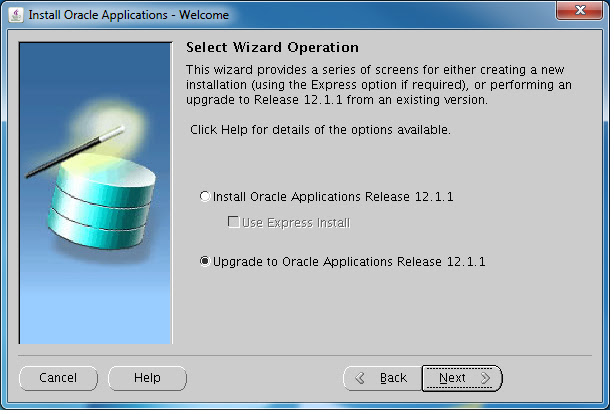


 15. Click “Next”

16. when the installation finished, at the Linux window(not the Xwindow), you will see some lines like:
17. start from this step, we will install apps on other servers. We may have to change the oraInventory on those apps servers,
18. select “Install Oracle Applications Release 12.1.1”


21. click “next”

22. click “next” 
23. repeat step 18 to 24 for all other servers.
This is based on you are using NFS mount for your shared appl_top, you need to setup three mount points:
For other shared file system options, please see Steven Chan's blog
Choosing a Shared File System for Oracle E-Business Suite
1. local mount to hold your application $INST_TOP:
/apps/PROD
2. NFS mount for your shared appl_top, application $APPL_TOP, $COMMON_TOP, $ORACLE_HOME, $IAS_ORACLE_HOME:
/oracle/PROD
3. database(SAN mount) for your database:
/database/PROD
Steps:
1. Click next

2. Select “Upgrade to oracle Applications Release 12.1.1

3. Click next

4. Select “Create Upgrade File System”

5. Select a port pool(the rule here are, if you choose pool 1, then the http port will be 8000+1, so http port is 8001, and database port is 1521+1, so the db port is 1522.)

6. Fill in database information
here, you database host is Primary, SID is PROD, the database $ORACLE_BASE is /database/PROD. Because this is an upgrade, so I assume that you already have this database installed with all your 11i data. (here I put my primary apps node and database node in the same server)

7. fill in your apps password and Click next, 

8. Fill in Base directory, and instance directory, and click “Edit Services”. (here I put my primary apps node and database node in the same server)
in the "Base directory" I put the direcotry under NFS mount, which will be your shared appl_top
in the "Instance directory" I put my local mount, which will be your $INST_TOP for this node.

9. Select services you want to run in this server.(This just an example here, usually in production instance, people may just want to put the "Batch processing services" into the same node as database, and leave all others to some low end servers(less CPUs). )

10. Click “Add Server”

11. Change the Host Name, and Check “Shared file System”, and click the “Edit Services”
in the "Instance directory" I put my local mount in apps1, which will be your $INST_TOP for this node.

12. Disable both “Batch Processing Services” and “Other Services”


13. Repeat step 11-13 for other servers, and click “Next”

14. Click “Next”
 15. Click “Next”
Configuration file written to: /apps/PROD/inst/apps/PROD_Primary/conf_PROD.txt
Copy this file to another directory, like somewhere under your NFS mount, here I copy it to /oracle/PROD/. you will need it to configure other severs.
edit or create a file /etc/oraInst.loc
put two lines in this oraInst.loc
inventory_loc=/apps/oraInventory
inst_group=dba
create a directory /apps/oraInventory
and chmod –R 777 /apps/oraInventory
start the installation
Click “next”

19. click “next”

20. select “Load the following saved configuration”, and put the file that we copied in step 17 in here. And click “next”


"Logged in As" someone else in 11i and R12
On the OAHOMEPAG "Logged in As" string, in the upper right corner of the page, indicates you are logged in as someone else.
If you are using F5 BigIP to off load SSL, then try not use the RAM cache in your HTTP profile or exclude some URI like /OA_HTML/AppsLogin, /OA_HTML/OA.jsp in your cache setting for HTTP profile.
If you are using F5 BigIP to off load SSL, then try not use the RAM cache in your HTTP profile or exclude some URI like /OA_HTML/AppsLogin, /OA_HTML/OA.jsp in your cache setting for HTTP profile.
Monday, August 20, 2012
mod_osso in httpd.config
when you get error in Apaceh error log like this(in R12) :
mod_oc4j: Response status=499 and reason=Oracle SSO, but failed to get mod_osso global context.
check your httpd.conf under $INST_TOP/ora/10.1.3/Apache/Apache/conf/
make sure this line looks like (not #include "\Apache\A.....)
include "\Apache\Apache\conf\mod_osso.conf"
mod_oc4j: Response status=499 and reason=Oracle SSO, but failed to get mod_osso global context.
check your httpd.conf under $INST_TOP/ora/10.1.3/Apache/Apache/conf/
make sure this line looks like (not #include "\Apache\A.....)
include "\Apache\Apache\conf\mod_osso.conf"
Thursday, March 8, 2012
Unlock orcladmin account
If the superuser, cn=orcladmin account is locked(when you try to run diptester or oidadmin), use the oidpasswd utility to unlock the super user orcladmin account, you need to set you env first, then:
oidpasswd unlock_su_acct=true
oidpasswd unlock_su_acct=true
Subscribe to:
Posts (Atom)